Vietnam e-Visa Photo Requirements: Photo Size, Rules & Tips
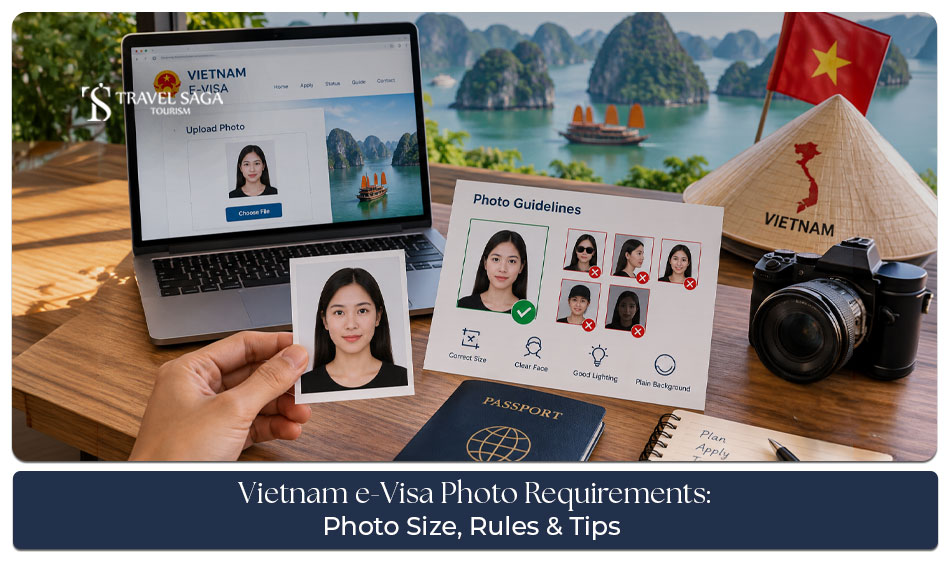
Applying for a Vietnam e-Visa is mostly an online process, so your documents as well as photos need to be ready in the correct format. A photo may look like a small part of the application, but uploading an incorrect image can cause problems during the time of visa submission. Understanding the Vietnam e-visa photo requirements before you apply for a visa can save time and help you avoid simple mistakes. This guide will help explain the photo size, file limits, basic rules, upload process, and it will also give you some useful tips for preparing your Vietnam visa photo.
What Are the Vietnam e-Visa Photo Requirements?
The Vietnam e-visa application requires a recent portrait photo and a clear image of your passport information page. Also, both images should properly meet the Vietnam e-visa requirements, which are shown on the official e-Visa application system. Before applying, it is also helpful to review the complete Vietnam e-Visa Requirements for Tourists.
Vietnam e-Visa Photo Size and File Size
The official Vietnam e-Visa portal says that the portrait photo must be under 50 KB. The passport data page image must be under 200 KB. However, before uploading the photo, you should check the file size carefully.
What Type of Photo Do You Need?
You need a clear portrait photograph for the visa application. You will also need an image of your passport data page. The passport image should show your important details very clearly. Also, you should avoid cropped, dark, blurry, or incomplete passport images. You can also book our Vietnam Tour Packages and plan your flights, accommodation, sightseeing, and transfers in one place.
Enquire - Vietnam Visa from UAE
Vietnam e-Visa Photo Guidelines You Should Follow
Following a few simple rules can help you to prepare a suitable photo. Check out our Vietnam e-Visa for UAE Residents guide for more details on the application process and requirements.
Use a Clear and Recent Photo
Always use a recent, size photograph where your face is easy to see. Also, you should not use photos that may no longer look like you.
Keep Your Face Clearly Visible
Your full face should be visible, and it should also be easy to identify. Avoid anything that covers important parts of your face.
Use a Plain Background
A simple, clean background is the safest choice. Do not take your pictures with busy backgrounds, people, furniture, or other objects behind you.
Keep a Natural Expression
Look straight at the camera and keep a natural expression. Avoid unusual poses, tilted faces, or exaggerated expressions.
Use Good Lighting
Make sure that your face is properly lit. Strong shadows, reflections, or very dark images can make the photo difficult to review.
Vietnam e-Visa Photo Rules: What Can Cause Problems?
Small mistakes can make an otherwise good photo unsuitable for an online visa application. You can also apply with our Vietnam Visa from UAE service for support with your visa application and travel plans.
Blurry or Low-Quality Photos
You should not upload an image that looks pixelated or unclear.
Heavy Shadows
Avoid strong shadows across your face or background.
Face Covered by Hair or Accessories
Make sure that your face remains clearly visible in the photo. Also, you should not use accessories that can hide your important facial features.
Sunglasses or Tinted Glasses
Sunglasses can make your face harder to identify. So, it is safer to use a clear, unobstructed portrait.
Incorrect File Size
Don’t forget to check the file size before uploading. The official portal states that the portrait photo should be below 50 KB.
Can You Use a Passport Photo for a Vietnam e-Visa?
A passport-style photograph may work if it meets the current online application requirements. However, having a printed passport photo does not automatically mean the digital file is ready for upload.
Passport Photo vs Digital Visa Photo
The important thing is to prepare a clear digital image that meets the requirements of the e-Visa system.
Can You Take the Photo With Your Phone?
Yes, you can take a suitable photo with your phone if you have good lighting, a plain background, and a clear camera. However, you should also check the final image carefully before uploading it.
How to Take a Vietnam e-Visa Photo at Home
You do not always need a professional studio to take a simple visa photo. You can also check the best time to visit Vietnam in 2026 so you can choose the right season for your destinations and activities.
Choose a Plain Background
Stand in front of a clean, uncluttered background.
Find Good Lighting
Make use of even lighting so that your face can be clearly visible, and there are no strong shadows.
Position the Camera Correctly
Keep the camera straight and at a suitable height. While clicking the photo, you should look directly at the camera.
Keep Your Face Straight
Do not tilt your head or take the picture from an unusual angle.
Check the Final Image
Look at the photo before uploading. Make sure your face is clear, and the image is not blurry.
How to Resize Your Vietnam e-Visa Photo
The official portal gives a specific file-size limit for the portrait photo. It should be under 50 KB.
Check the File Size
Always check the size of the final file before uploading it.
Keep the Image Clear
Do not reduce the file size so much that the photo becomes blurry or it becomes difficult to identify.
Check the Format
Use a file format that is mentioned in the current Vietnam e-visa application system and check the official portal for the latest technical requirements.
Vietnam e-Visa Photo Requirements vs Passport Page Photo
The two uploads serve different purposes. You can also read our guide on Vietnam e-Visa delays to understand the common reasons for delays and what you can do next.
| Requirement |
Portrait Photo |
Passport Data Page |
| Purpose | Identifies the applicant | Shows passport details |
| File size | Under 50 KB | Under 200 KB |
| Main concern | Clear face | Clear passport information |
How to Upload Your Photo for a Vietnam e-Visa
Once your images are ready, the online process is straightforward. It is also worth checking these things to know before you go to Vietnam so you can prepare better for your trip.
Step 1: Prepare Your Portrait Photo
Check the quality and file size before starting the application.
Step 2: Prepare Your Passport Image
Make sure that your complete passport data page is clear and readable.
Step 3: Upload Both Images
Upload the required portrait and passport page images to the relevant fields.
Step 4: Review Before Submitting
Check the images and your personal details carefully before submitting the application.
Common Vietnam e-Visa Photo Mistakes to Avoid
Avoid these simple mistakes:
- Uploading a blurry photo
- Using a busy background
- Covering your face
- Using an unsuitable image
- Ignoring the file-size limit
- Uploading an unclear passport page
- Cropping important passport details
- Not checking the final files before submission
Vietnam e-Visa Photo Requirements for UAE Residents
If you are applying for a Vietnam e-Visa while living in the UAE, getting your photo ready is an important step. The same basic Vietnam e-Visa Photo Requirements, so it is best to check your image carefully before uploading it. It is also helpful to review these Vietnam travel do’s and don’ts so you can avoid common mistakes and enjoy a smoother trip.
Vietnam e-Visa Photo Requirements for UAE Applicants
UAE residents who are applying for a Vietnam e-Visa should follow the current photo requirements that are shown on the official application system. Your country of residence does not change the need to provide a suitable digital photo and passport image.
Check Your Photo Before Uploading
Before submitting your application, you should also make sure that your photo is clear, recent, and meets the required file-size and format conditions. A quick check can help you avoid simple upload issues.
Prepare Your Passport Image
You will also need a clear image of your passport information page. Make sure all important details are visible and easy to read. Avoid blurry images or photos with missing passport details.
Get Your Documents Ready in Advance
If you are planning a Vietnam holiday from the UAE, you should properly prepare your visa documents before finalising your travel plans. This will give you enough time to check your Vietnam e-visa photo requirements and also make sure that everything is ready for online submission.
Final Thoughts
Getting your photo right is a small but important part of the Vietnam e-Visa application. Also, you should properly check the Vietnam e-visa photo requirements, especially the file-size limit, image quality, and passport page upload. Properly follow the Vietnam e-visa photo guidelines and avoid common mistakes before going for final submission of your application. With the right documents which are prepared in advance, the online process can be much easier. For professional assistance, Travelsaga.com can also assist you with your Vietnam travel and visa planning.
Frequently Asked Questions
Q. What is the required photo size for a Vietnam e-Visa?
The official Vietnam e-Visa portal states that the portrait photo must be under 50 KB. However, you should always check the official portal for the latest requirements before applying.
Q. How many KB should a Vietnam e-Visa photo be?
The portrait photograph should be less than 50 KB according to the current official e-Visa portal requirements.
Q. Can I use a photo that is taken on my phone for a Vietnam e-Visa?
Yes, you can use a phone to take a photo, but it should be clear and meet the current application requirements.
Q. Can I wear glasses in my Vietnam e-Visa photo?
Your face should remain clearly visible. Avoid glasses that create strong reflections or make your facial features difficult to see.
Q. Can Travel Saga Tourism help me with Vietnam visa applications?
Yes. Travel Saga Tourism provides visa-related assistance and travel services, which will help travellers to prepare for their Vietnam trip. For more queries, you can visit our Frequently Asked Questions page.